

Quarkus - Hello world example using Kotlin!

Learner, Love to make things simple, Full Stack Developer, StackOverflower, Passionate about using machine learning, deep learning and AI
Quarkus with kotlin getting started example. If you are new to the quarkus then please watch the below video to get started with Quarkus.
[%https://youtu.be/B4h9dY3H678]
Tech Stack:
- Kotlin
- VSCode
- Quarkus
- GRadle
- REST API
Create Project:
Create a project using the launch Quarkus Initializr using https://code.quarkus.io/ or you can use the VSCode editor.
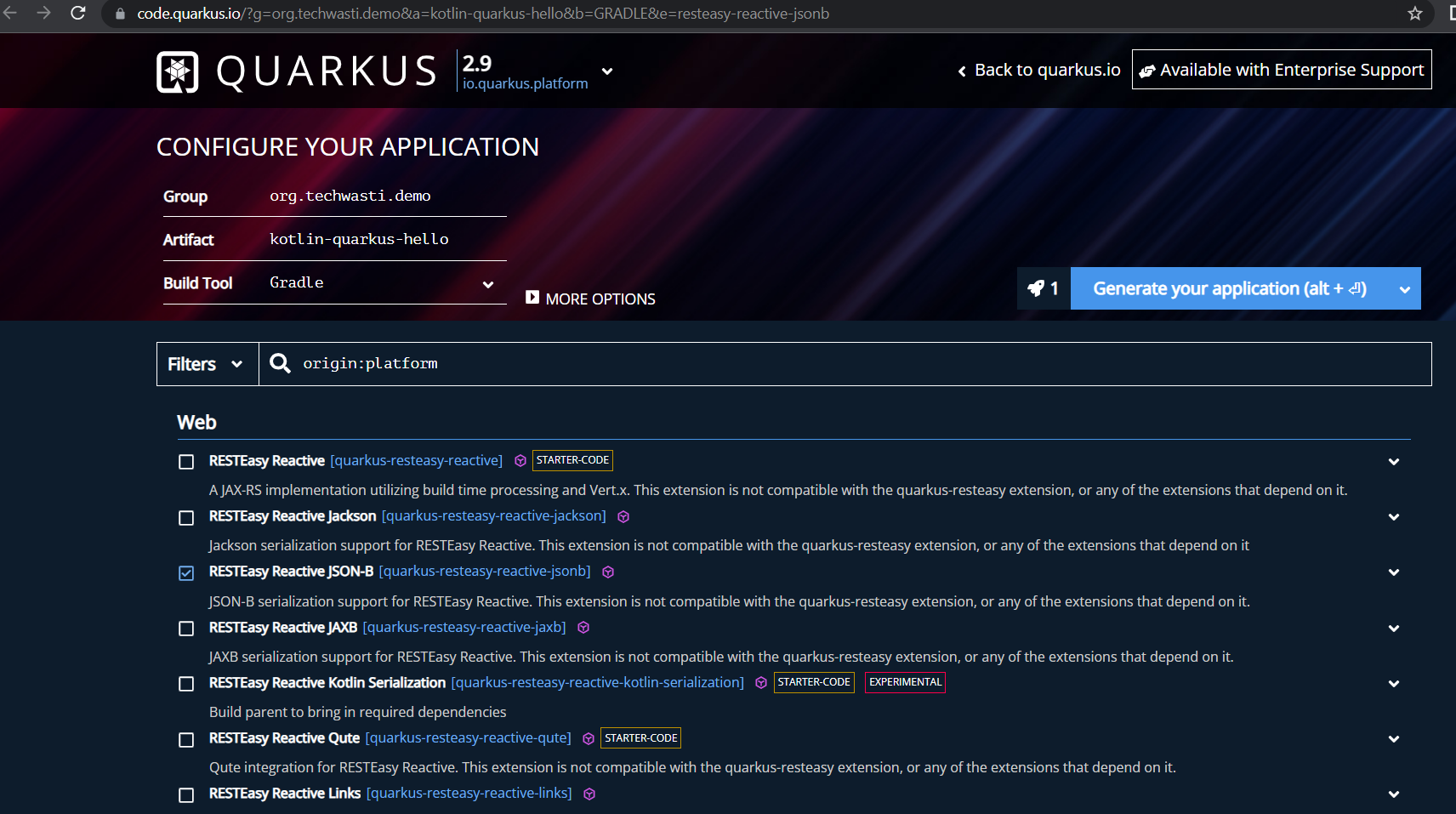
Check the above screenshot, we have specified the following details:
- Build Tool: Gradle with Kotlin
- Group: org.techwasti.demo
- Artifact: kotlin-quarkus-hello
- Search & Pick extensions: RESTEasy JSON-B
Generate a Quarkus project and downloads it. then, Unzip the downloaded zip file and import it into your favorite IDE.

See the Project Structure,

Quarkus core Technologies :
- Quarkus uses RESTEasy for the JAX-RS endpoint.
- Quarkus uses Vert.x and Netty at its core, providing a reactive and non-blocking HTTP layer.
- Quarkus uses JBoss Log Manager as the default logging framework.
- Quartus utilizes a modified version of Undertow that runs on top of Vert.x
- Quarkus uses SmallRye Config, implementation of Eclipse MicroProfile Config, for configuration data.
For testing:
- Quarkus uses JUnit 5 for testing.
- Quarkus uses rest-assured to test HTTP endpoints.
build.gradle file
plugins {
    id 'java'
    id 'io.quarkus'
}

repositories {
    mavenCentral()
    mavenLocal()
}

dependencies {
    implementation enforcedPlatform("${quarkusPlatformGroupId}:${quarkusPlatformArtifactId}:${quarkusPlatformVersion}")
    implementation 'io.quarkus:quarkus-resteasy-reactive-jsonb'
    implementation 'io.quarkus:quarkus-arc'
    implementation 'io.quarkus:quarkus-resteasy-reactive'
    testImplementation 'io.quarkus:quarkus-junit5'
    testImplementation 'io.rest-assured:rest-assured'
}

group 'org.techwasti.demo'
version '1.0.0-SNAPSHOT'

java {
    sourceCompatibility = JavaVersion.VERSION_11
    targetCompatibility = JavaVersion.VERSION_11
}

compileJava {
    options.encoding = 'UTF-8'
    options.compilerArgs << '-parameters'
}

compileTestJava {
    options.encoding = 'UTF-8'
}
Let us see the hello world controller coding.
package org.techwasti.demo;

import javax.ws.rs.GET;
import javax.ws.rs.Path;
import javax.ws.rs.Produces;
import javax.ws.rs.core.MediaType;

@Path("/hello")
public class GreetingResource {

    @GET
    @Produces(MediaType.TEXT_PLAIN)
    public String hello() {
        return "Hello from RESTEasy Reactive";
    }
}
In this code snippet, we have a GET endpoint that is returning the string. Let us run the command to build the project
gradle build
To run the application then use the below command.
./gradlew --console=plain quarkusDev
And hit URL
$ curl -w "\n" http://localhost:8080/hello
SourceCode:
Find the complete source code here.
https://github.com/knowledgefactory4u/Quarkus/tree/main/kotlin-quarku-helloworld
Conclusion:
This article demonstrates you quarkus kotlin helloworld application.
More such articles:
https://www.youtube.com/channel/UCiTaHm1AYqMS4F4L9zyO7qA
==========================**=========================
If this article adds any value for you then please clap and comment.
Let’s connect on Stackoverflow, LinkedIn, & Twitter.
